Send the auditor a link, not a PDF
4 September 2026
A policy document tells somebody what you promised. It cannot tell them whether the promise is currently being kept. Certifly now publishes policies as versioned documents with recorded approvals — and puts the live state of the checks that test each control on the same page.
The usual artifact in an audit is a PDF. It was true when it was exported, it carries no indication of who approved it, and the reader has no way to tell whether the controls it describes are actually in force this morning. Everybody involved knows this. The screenshots that accompany it exist precisely because the document cannot speak for itself.
So we built the other thing: a policy that lives in the platform, versioned; approvals recorded against a specific revision; and a link you can hand to an assessor that renders the version in force, who signed it off, and whether the checks behind each control are passing right now.
What the recipient sees
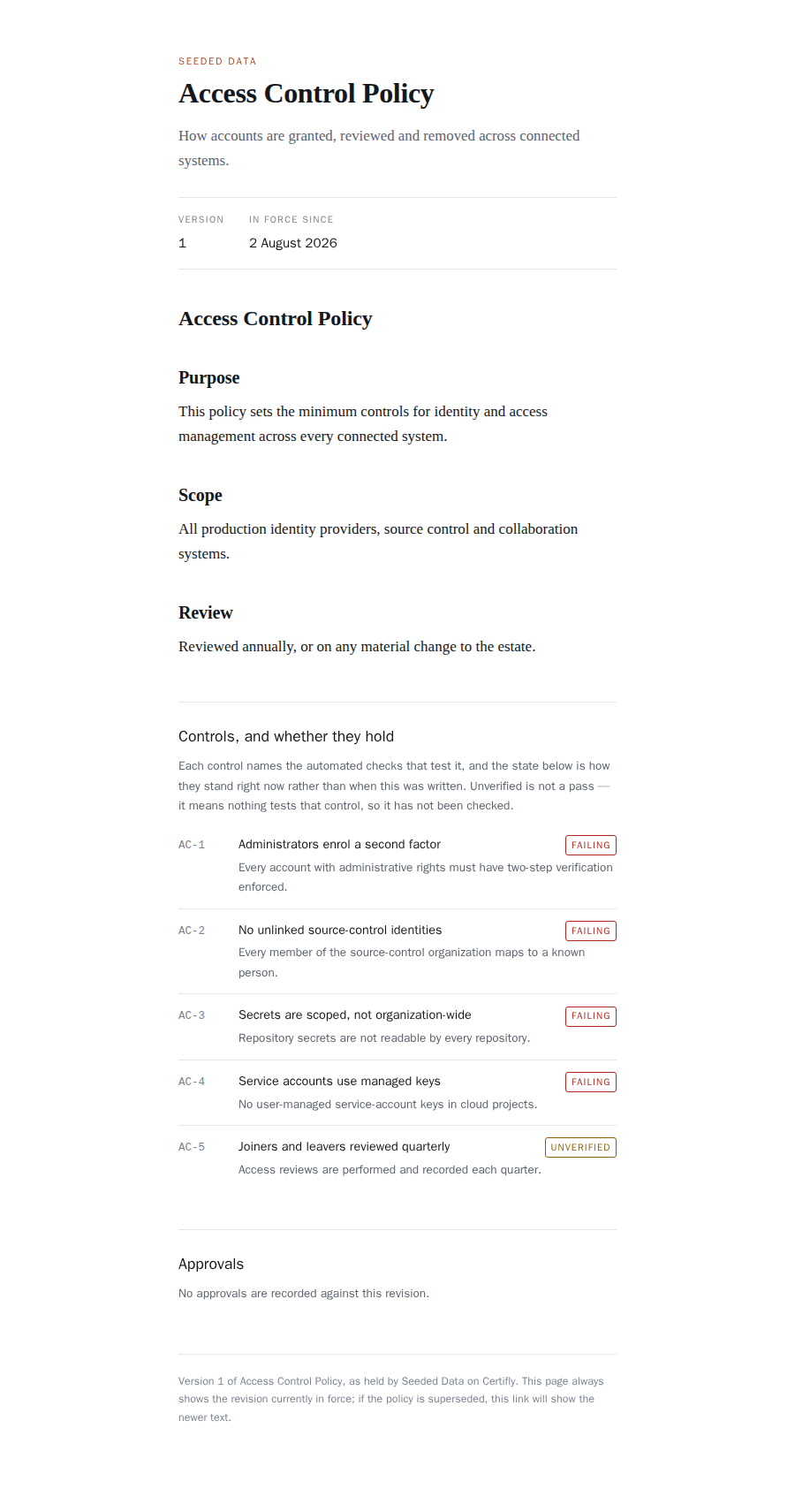
No account is needed. The page carries no application JavaScript and makes no API call:
it is server-rendered HTML and one stylesheet, so it opens in a locked-down browser on an
assessor's machine. It is noindex and no-store, because a link
pasted into an email should not become a search result or sit in a shared cache.
Unverified is not a pass
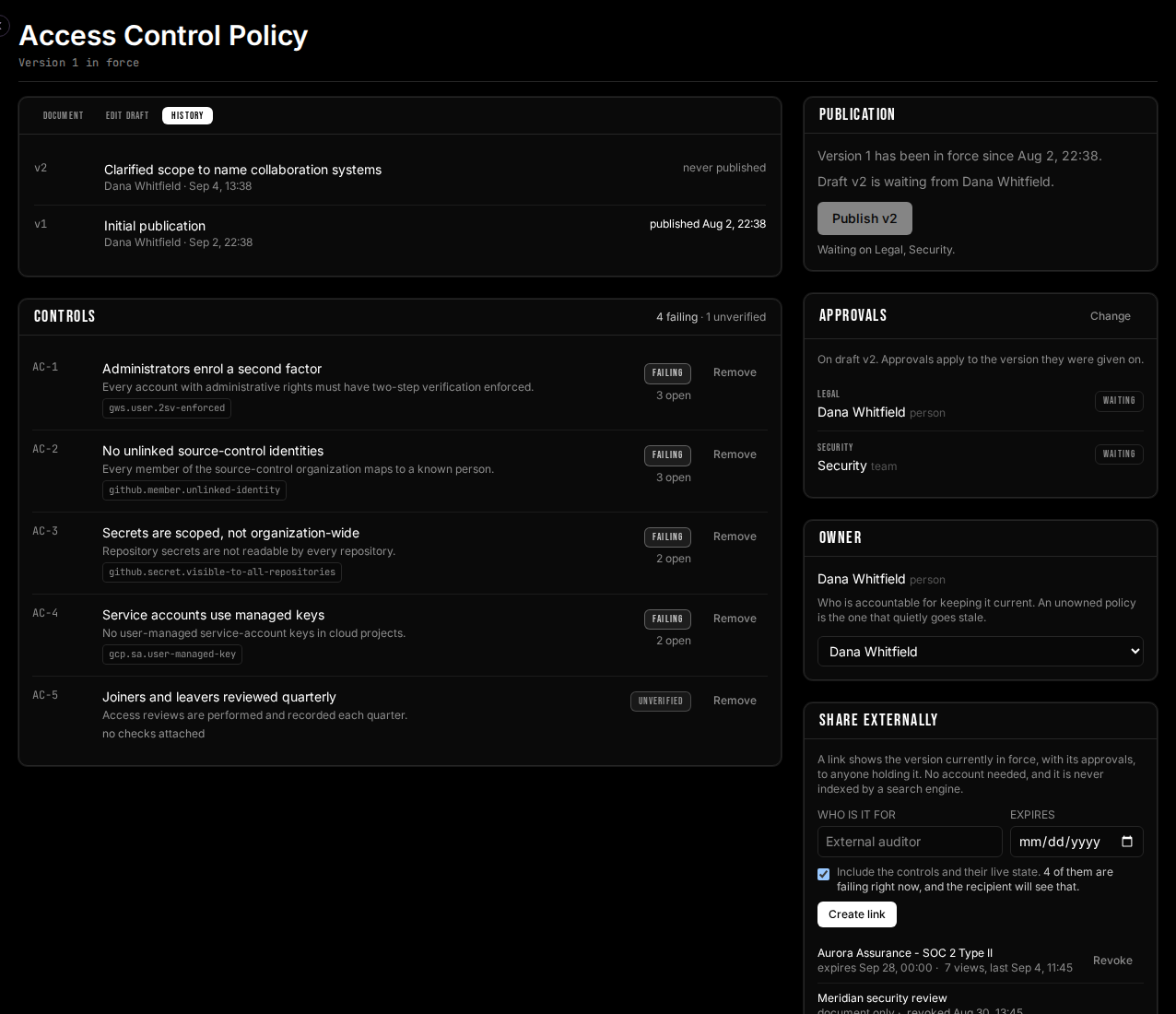
Look again at AC-5 in that screenshot. It is not failing. It is
unverified — nothing tests it, so nothing has checked it. A control
that cites no checks, or cites checks nobody has written, gets its own state and its own
color, closer to a warning than to a success.
Rendering that control green would be the single most misleading thing this product could do, and it is the thing most tools do by omission. Absence of evidence is not evidence of absence.
It looks like your document, not ours
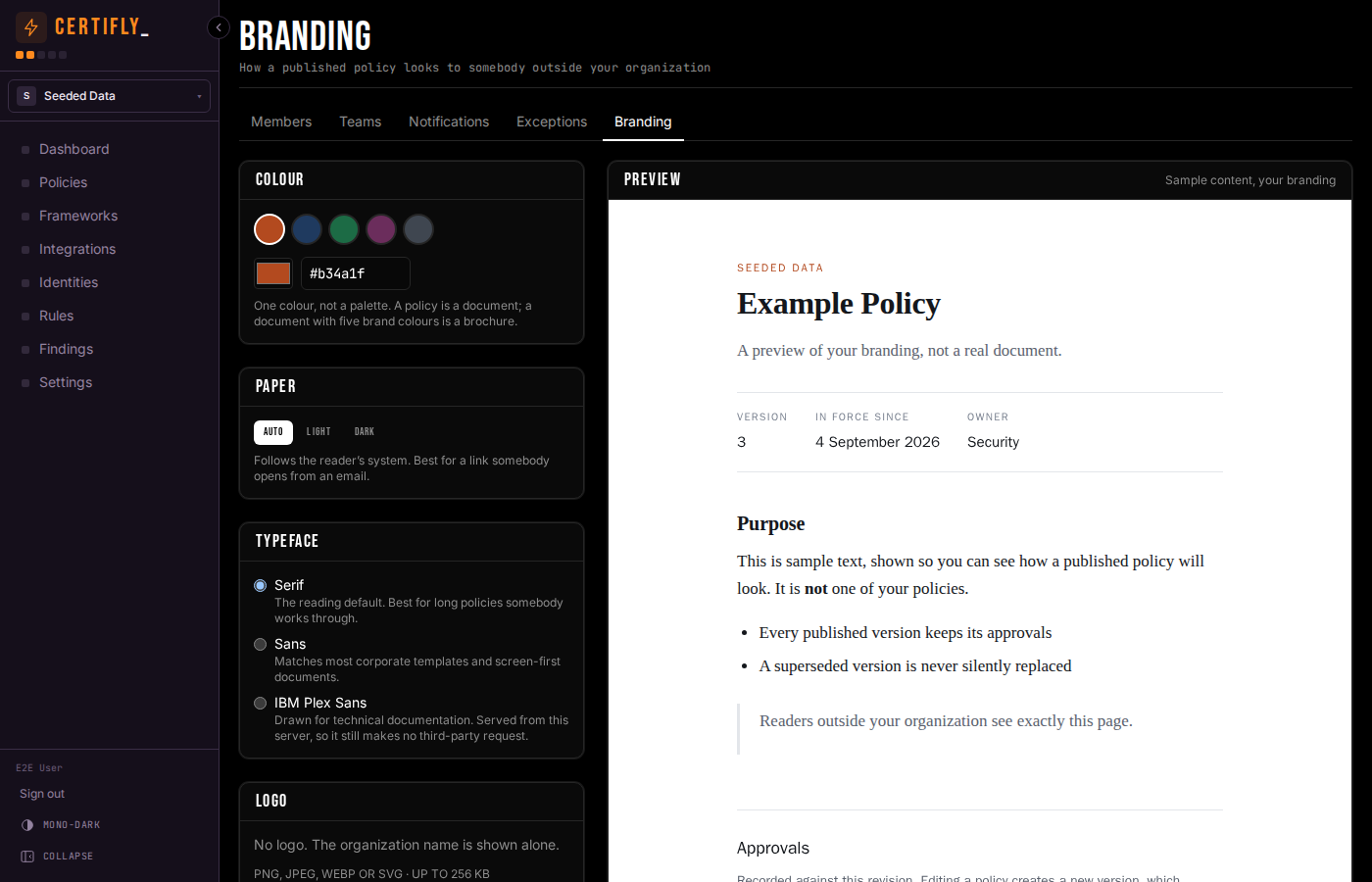
A policy handed to an auditor is the company's document. One that arrives in the vendor's colors reads as the vendor's. Settings → Branding sets an accent, a paper (light, dark, or follow the reader's system), a typeface, a logo and a footer note — a confidentiality line, a company number — and every published policy uses them.
Why there is no CSS box
The obvious way to build this is a textarea of custom CSS. We deliberately did not.
Author-supplied CSS served from our own origin is an exfiltration primitive, not just a
styling one — attribute selectors plus url() read a document out one
character at a time — and this is the one page in the product designed to be read
by people outside your organization.
So the builder takes structured values and generates the stylesheet server-side. Every
value is parsed into a known shape and re-emitted from that shape. The generated sheet
can only set colors and fonts: it cannot write a display,
position or visibility rule, so branding can change how a
policy looks and never what it shows. There is a test that fails if
that ever stops being true.
Approvals belong to a revision, not to a policy
Naming who must sign off — Legal, Security, a named person, or better, a team — makes their approval a condition of publication. Not a reminder: publishing is refused until every required approver has approved that exact revision, and the check runs inside the same database statement that publishes it, so it cannot be raced.
Which means the oldest trick in policy management does not work here. Approve, quietly edit, publish — editing creates a new revision, and a new revision carries none of the previous approvals. The interface says so before you start typing rather than after you save.
A one-person company can still approve its own revision. It is recorded as such, and the page says “approved their own version” rather than presenting it as independent review. The point is not to prevent it; the point is that an auditor can see what it was.
Everything you set, you set in one place
All of this is configured on the policy itself, in Policies → the document you are working on. There is no separate settings screen for who approves what, and no second place where a policy can be half-configured.
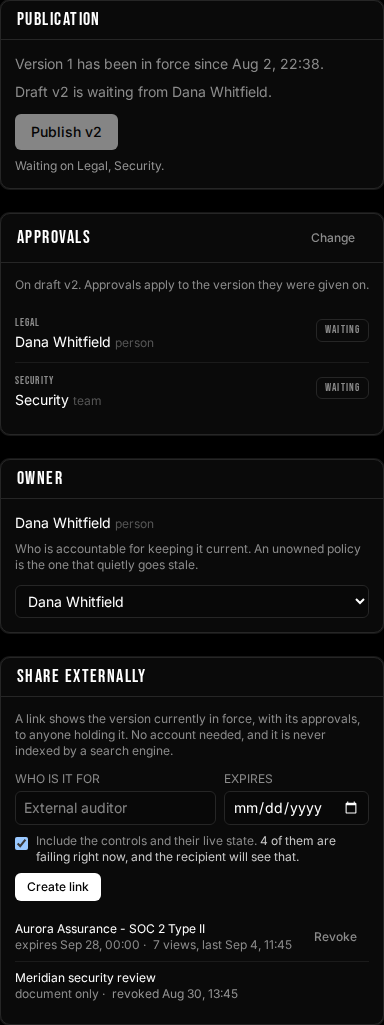
- Publication. Which version is in force, which one is waiting, and — when it cannot go out yet — the names it is waiting on.
- Approvals. Add a person or a team, and label what they are signing off as: “Legal”, “Security”, “Data protection”. The label is separate from the team name on purpose, because the same team can hold different responsibilities on different policies. Prefer a team: a named individual makes the policy unpublishable the day they leave.
- Owner. A person or a team who is accountable for keeping it current. An unowned policy is the one that quietly goes stale.
- Sharing. Covered below — who the link is for, when it expires, and whether it carries the checks.
Deciding who must approve is an administrator's job rather than an author's, and that is enforced rather than suggested. An author who could name their own approvers could name themselves, and the gate in front of publication would be one the person being gated controls.
Controls are where the document meets the estate
A control is a claim the policy makes, and it names the audit checks that test it. That link is the whole trick: it turns a sentence into something continuously verified, and it is what lets the published page say anything about right now. A control citing no checks — or citing checks nobody has written — reads unverified, never green.
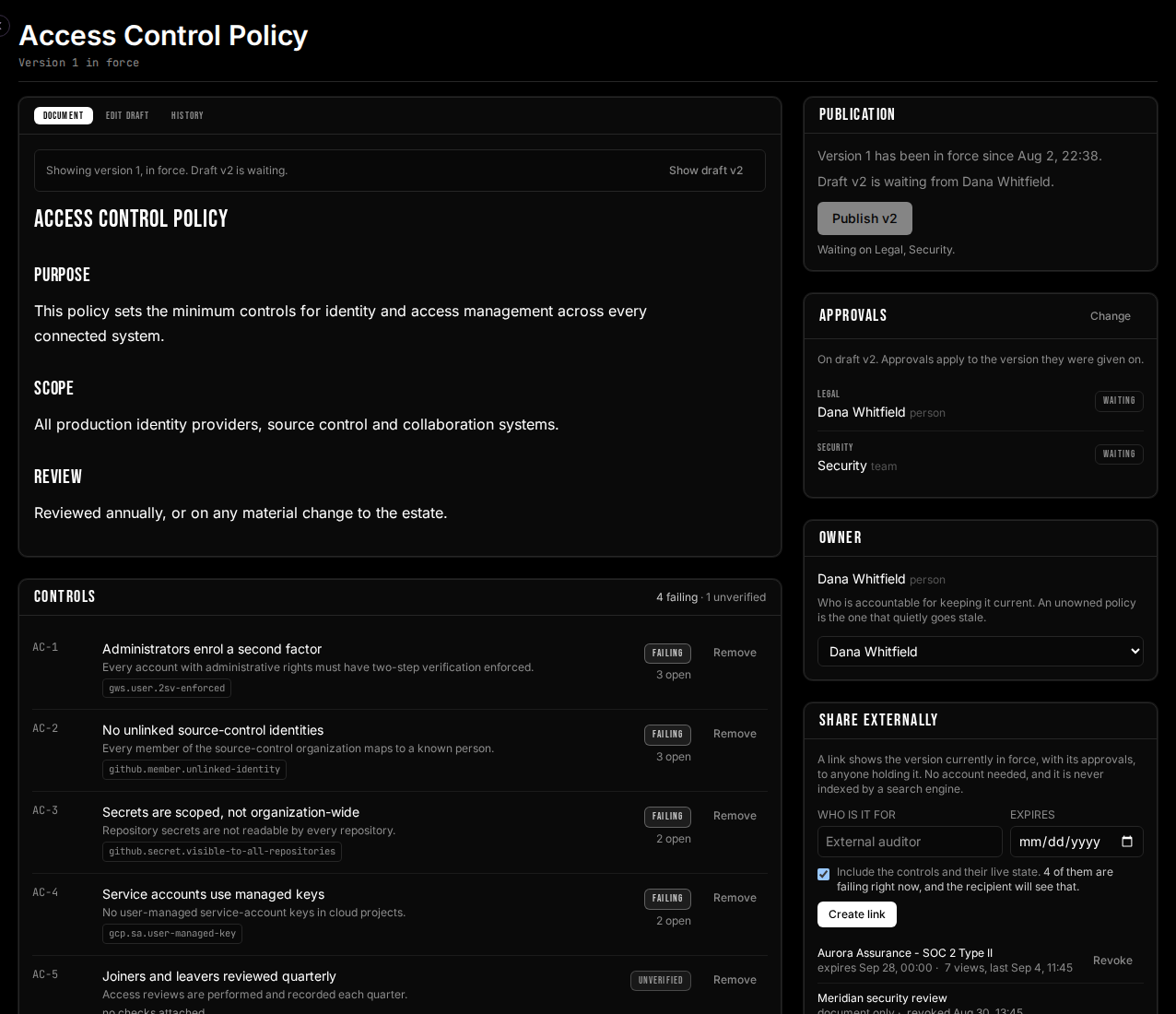
Each control shows the check it cites and how many findings are currently open against it,
so “failing” is a link into the work rather
than a verdict you have to go and interpret. AC-1 in the History view below
cites gws.user.2sv-enforced and has three accounts open against it. Write a
control with no check and the panel tells you immediately — AC-5 says
no checks attached, and that is a to-do list, not a decoration.
Every version, and why it exists
Links you can scope, time-box and take back
A share link is minted for one recipient and labeled with who it is for, so revoking the right one in eight months is a decision rather than a guess. You can give it an expiry date, and you choose whether it carries the controls or only the document — an assessor and a prospect in a security review are different errands.
Both are in the sidebar screenshot above. Aurora Assurance — SOC 2 Type II expires on 28 September, carries the controls, and has been opened seven times. The Meridian link below it went out as document only and was revoked in August. That list, not somebody's sent-mail folder, is the answer to “who can still read our access-control policy?”
The link always renders the revision currently in force, never the one that was current when you sent it. An auditor holding a link in June sees the June text. Pinning would quietly show them a superseded document, which is precisely the failure this whole feature exists to prevent.
You can copy the URL again at any time, and you can put a password on a link when the URL alone is not enough. More on both below. Revoking keeps the row either way: “issued to the assessor in March, revoked in May” is a thing worth being able to say.
We changed our minds about showing you the URL again
This shipped storing only a hash of the token, on the same reasoning as a session cookie: a leaked backup should hand out no working links. It also meant the URL existed for exactly as long as the box that displayed it. Close the dialog and the only remedy was to revoke and re-issue — which changes the URL an auditor is already holding, three weeks into the engagement.
That is a worse outcome than the one the rule was protecting against, so the token is now also sealed under your organization's data-encryption key, exactly as the credentials for your Google Workspace and Okta connections already are. The hash stays and is still what the public page looks a link up by. The property that mattered survives: the key that opens the sealed copy lives in the deployment's secret and never in a database row, so a stolen backup still yields nothing.
One deliberate restriction: the URL is a separate, explicit request, never a field on the list of links. A list is re-fetched on every render, and a secret that rides along with one ends up in every log line, cache entry and error report that list ever passes through. Pressing Copy URL is an act; loading the page is not.
A password, when the URL is not enough on its own
A token in a URL is a bearer credential, and URLs get forwarded, pasted into tickets and quoted in replies. So a link can carry a password — PBKDF2-HMAC-SHA256, per-link salt, and the iteration count stored per row so it can be raised later without invalidating links people are already holding.
It is off by default, on purpose. A password nobody asked for is a password that gets sent in the same email as the link, which is worse than none because it looks like control. The field says so.
Viewership, and what we deliberately do not collect
Each link records how many times it has been opened and when it was last seen. That is enough to answer the question that actually matters — has anyone used this, and is it safe to revoke? — and it is where we stopped.
We do not log visitors. No IP addresses, no user agents, no per-view records. The people opening these links are outside your organization and did not sign up for anything, and our privacy policy says what is collected. A counter and a timestamp answer the operational question; a visitor log would answer questions nobody asked us to answer.
If you need to know exactly who read a policy and when, that is a question about people inside your organization. It is a different feature, with notice attached — and it is not something to reach by quietly instrumenting a public page.
So we built the other one too
Alongside the share link there is a stable internal one: /r/access-control.
Your people sign in, read the version in force, and are recorded — who they
are, which revision they read, and roughly how long the page was open. It is the same
document, rendered by the same code, so an auditor and an employee cannot end up quoting
different text at each other.
The inversion is the design. An outsider cannot be told what is being collected before they click a link somebody emailed them, so nothing about them is collected. A member can be told, and is — in a notice above the document, before they read a word. The notice is rendered from the same flag that switches the recording on, so there is no arrangement of that code which records a read without saying so.
What is recorded is deliberately too thin to be repurposed later. No IP address, no user agent, no referrer, no scroll or activity trace — not “we do not display those”, but no column to put them in, with a test that fails if one is added. The duration is rounded to five seconds and capped at twenty minutes, so it can say “about two minutes” and can never say “at their desk from 14:03 to 14:05”. And the rows are deleted after thirteen months — enough to evidence an audit period, and not the indefinite record of who read what that nobody asked us to keep.
How it fits the rest
A control names the audit checks that test it, and those checks run against configuration imported from Google Workspace, Okta, GitHub, Slack and Google Cloud. That is what lets the published page say anything about the present tense at all.
The same controls map upward into frameworks. Say once that a control of yours implements “administrators authenticate with a phishing-resistant factor”, and every framework requirement that maps to it — SOC 2 CC6.1, HIPAA § 164.312(d) — picks it up together.
Try it
Write a policy, attach a control to a check you already run, name an approver, publish it, and send yourself the link. The whole loop takes about ten minutes, and the first thing you learn is usually which of your controls nothing is testing.
Sign in to get started — or read what we collect, which was written from an audit of the running system rather than from a template.